
Press the Users button.
The default Admin user is.
Username: Acquire
Password: Default
We recommend that you change these default details for security. I.e. create another Admin user, and then delete this default one.
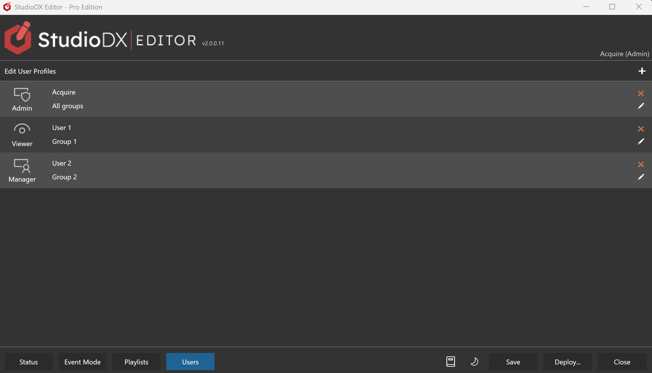
Pressing the ➕will add a new user.
Pressing ✏️on an existing user will let you edit it.
In both cases the screen below is shown.
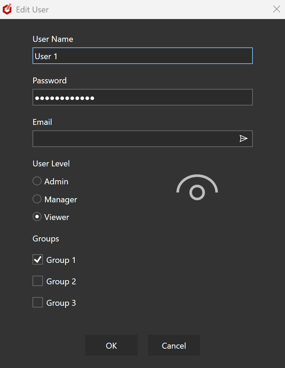
User Name & Password
The details with which the user logs into the Acquire Advanced Editor.
User Level
What the user has access to.
#
-
Admin
- User has full control over all groups.
- User can edit other user log-ins.
-
Manager
- User can view and edit the groups assigned to them.
- Cannot Delete Media
- Add New Users
-
Viewer
- Only the status screen is shown, showing the groups assigned to the user.
Groups
A list of all groups available. Selected ones which you wish the user to administer. This can be useful when 3rd parties are accessing the system and you only wish them to control certain screens. However, note that they will still have access to the Media Repository and Windows OS functions.
If you change the groups in future, remember to allow access to the new groups to any users who require it.