
The video may support transparency in any of the following formats:
- WebM VP8
- Apple Pro-res 4444
- Apple Animation (PNG Sequence)
- Vidvox Hap Alpha (Hap5)
This widget requires a separate video for each player output.
If a row in the Playlist Editor uses this transition widget, transition outputs appear above the regular ones for that row:
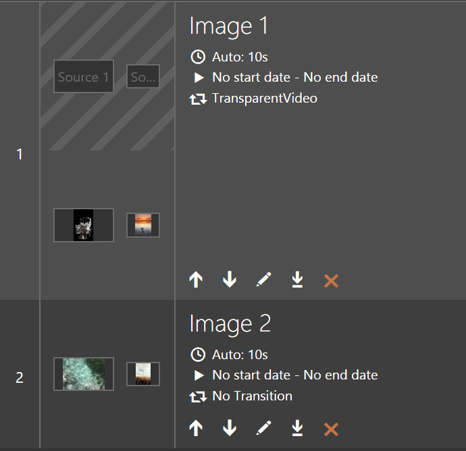
Drop your transition videos into the chevroned area.
Other Transparent Video settings are configured by opening the row editor dialogue and clicking Edit button next to the selected transition:
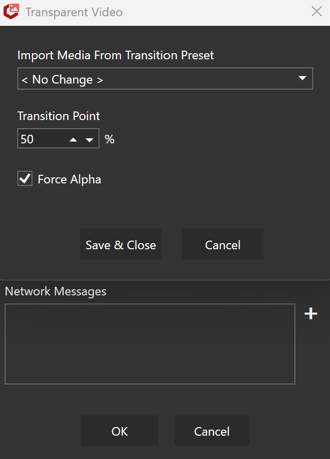
Import Media From Transition Preset
Select a preset created in the Transition Media Presets Editor.
-
The media for each output in the preset will be imported into this row's transtion outputs when you press Save & Close.
-
Leave as < No Change > keep the existing transtion media as it is.
Transition Point
-
The position (0-100%) within this video that the old content should be stopped and the new one start. At this position in the video the content should be used to hide this media change.
Force Alpha
-
True/false. If the file contains transparency this is ignored. If not, then this flag will force transparency by assuming the video is in "side-by-side" mode.
TIP - - Any video in "side-by-side" mode must have Force Alpha set to true.