
Resolution:
Yes. You can specify a date and time when the deployment should be sent.
To do this:
1. In Acquire Editor, go to Deploy, select PLUS! Network.
2. Log in to the desired account and select the Acquire Player(s) you wish to deploy to in Acquire Scheduler.
3. Right-click and Deploy to Selection.
4. Enable to the Delay sending until: option and select the required date and time, then click Deploy.
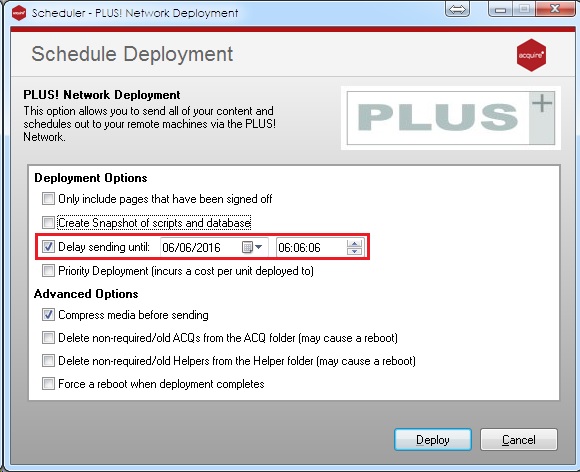
IMPORTANT: when using this feature you should be aware the deployment will be only be in a pending status from your Acquire Editor and is unusable whilst it is in this status. Therefore you cannot use any other feature, such as Playlist Editor or Page Editor, until the deployment is sent at the specified date and time. For this reason using Schedule Deployment should only be used when there is a need to send a deployment within the next few hours or days, such as overnight. Please note: if your connection also relies on a VPN, you should also ensure the connection does not time out after a given period of time whilst a deployment is pending and/or Windows Updates does not update and reboot the PC.