
Sign in
- Open Beacon.
- Select Sign in via Accounts.
- Complete the Acquire Accounts sign-in flow.
After successful authentication, Beacon opens the CMS. The pages and projects shown depend on your account and organisation permissions.
If sign-in fails, Beacon returns to the Sign In page with an error explaining whether the provider rejected the request, the session expired or the response could not be processed. Try again; contact support if the error continues.
The Sign In page also links to Acquire Digital's Terms, Privacy, Help and Contact pages.
Sign out
- Select your profile image in the header.
- Select Sign Out.
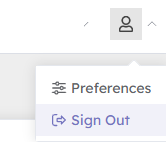
Beacon clears the current session and returns to the Sign In page.
Sign out when using a shared computer.