
You can also choose to have persistent content overlays over multiple rows and even between playlists. This is useful for banners or scoreboards, etc.
StudioDX Pro includes a feature called 'Overlays'. At the top of the Playlists window, you will see an icon  (if enabled in the Settings see Overlays) which allows you to create and modify overlay layouts. The Overlay editor allows you to include media and widgets anywhere on the outputs on a player, and name it for later use.
Once you have created Overlays, (See: OVERLAY Editor) you can then choose an overlay from the drop-down list at the top of the playlist editor for each player.
These are the 'defaults' for the playlist and can be overridden on a per-row basis too (enable this in the Group Settings / Miscellaneous menu).
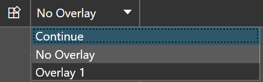
When using Overlays, if a playlist row (either an override on a row or when switching playlists) uses the same Overlay, the content will remain showing (this is signified by the word 'Continue' on top of each playlist line). It can also be changed to hide ('No Overlay'), or to show a different overlay by selecting one from the dropdown list.
If a playlist row contains a sub-playlist, Any overlays from that playlist will show as expected.
If no overlay is selected in that playlist, the current playlist's overlay will show. To prevent this, you should select 'No Overlay' on the sub-playlist, and ensure any subsequent playlist rows in the main playlist contains an overlay if you wish to show one.