---
title: Architecture of DOOHAd
description: Architecture of DOOHAd
---
[Skip to content](https://knowledge.acquiredigital.com/architecture-of-doohad#main-content)
English
Show submenu for translations
[More support](https://knowledge.acquiredigital.com/kb-tickets/new?hsLang=en) [Support Portal](https://knowledge.acquiredigital.com/support?hsLang=en)

Open main navigation
Close main navigation
- English
Show submenu for translations
- [More support](https://knowledge.acquiredigital.com/kb-tickets/new)
- [Support Portal](https://knowledge.acquiredigital.com/support)
- Contact us
Contact us
How can we help you?
- There are no suggestions because the search field is empty.
1. [Acquire Digital Knowledgebase](https://knowledge.acquiredigital.com/?hsLang=en)
2. [Acquire DOOHAD](https://knowledge.acquiredigital.com/acquire-doohad?hsLang=en)
# Architecture of DOOHAd
## DOOHAd is designed to be a flexible scheduling system you can use to automatically create playlists for a number of different Out of Home scenarios.
t it's heart, one (or more) playlists are created by the system for your screens (interactive kiosks or digital signage screens) to download and play. Content for these playlists can be managed by teams of people, via invites to clients or by third parties. The content can be automatically checked to ensure it meets with a screen's requirements (resolution, orientation and length), and will automatically get transcoded to a compatible format if required. Content uploaded by outside organisations requires approval before use, whereas content by your team can be auto-approved for streamlined operation.
**How?**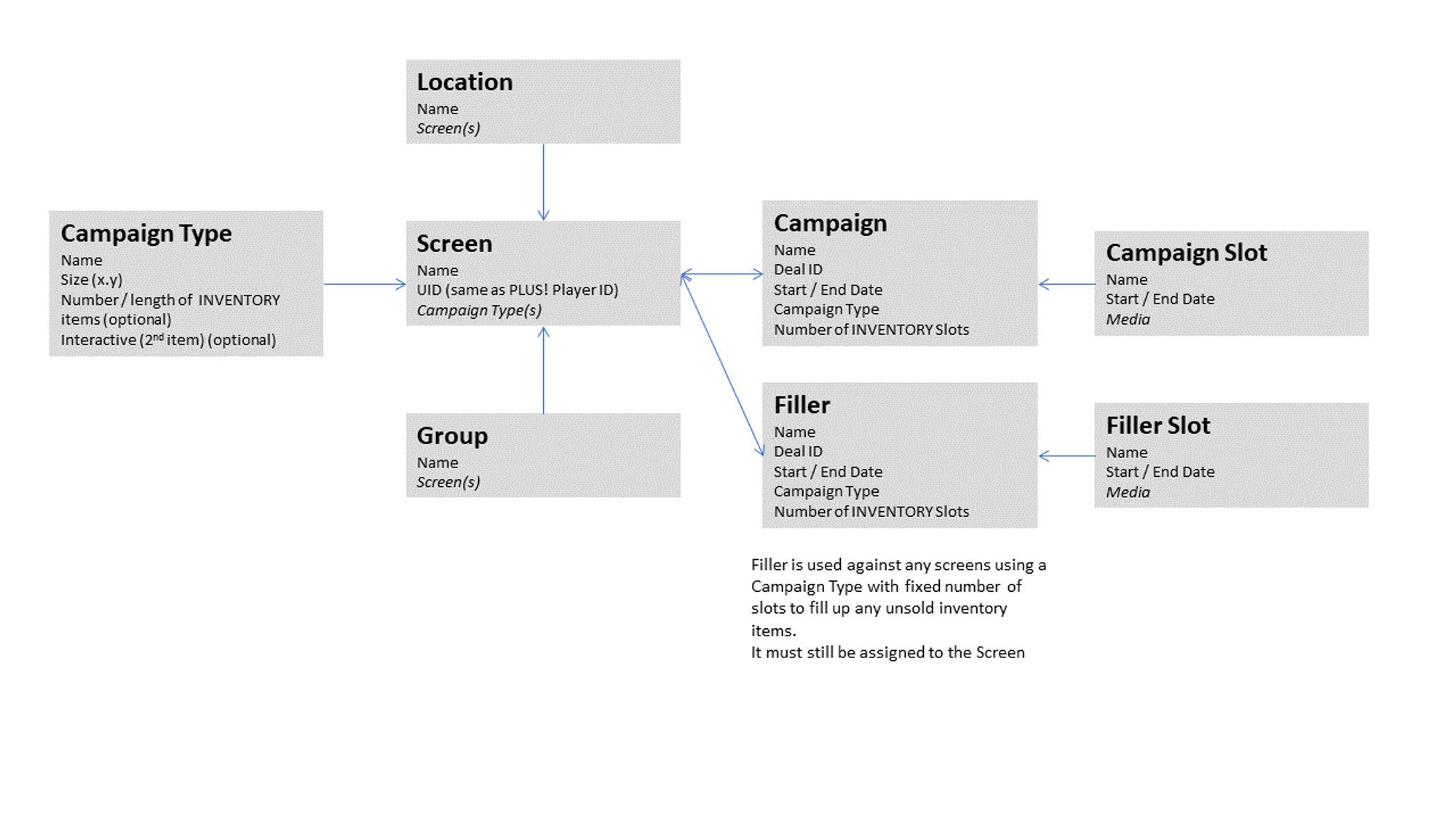
It all starts with Campaign Types. Here you can setup all of the different output styles you are using and selling. A full-screen Digital Billboard will typically be 1080pixels x 1920pixels - a 16:9 aspect ratio. However you may find you have a mixture of screens in your portfolio - or even systems (typically interactive ones) which show advertising as only a small portion of the actual screen output (think advertising banners).
Here also, you can decide if you want to have freedom over the playlists - effectively selling the ability to advertise without restraint (no guaranteed number of impressions) - or if you want a fixed playlist length so that an advertiser can understand they will get a guaranteed number of impressions for the period the campaign operates.
To clarify this:
Using an unconstrained playlist... If for example you have a playlist with 2 items in it of 10 seconds each. This makes the content play 3 times in a minute. In an hour, this plays for (60 x 3) 180 times. In 24 hours, this plays each advert (24 x 60 x 3) = 4320 times. And if both adverts are to run for 10 days, they will shown (10 x 24 x 60 x 3) = 43,200 times.
Now, if another 10-second advert is added to this playlist, each advert will now only play \*\*twice \*\*\*\*a minute. This means that all of the adverts will only play 28,800 times in their 10 day campaigns.
(note: the above assumes all campaigns start/stop on the same days, all players operate 24/7 and playout has no interruptions or delay between one item playing and the next - hence why most DOOH ad sales are an 'expected' number of impressions).
Obviously if an advertiser is expecting their adverts to play a guaranteed number of times (number of impressions), then we need to stop this number changing when other adverts are added/removed from the playlist. This is where the constrained playlists come in useful.
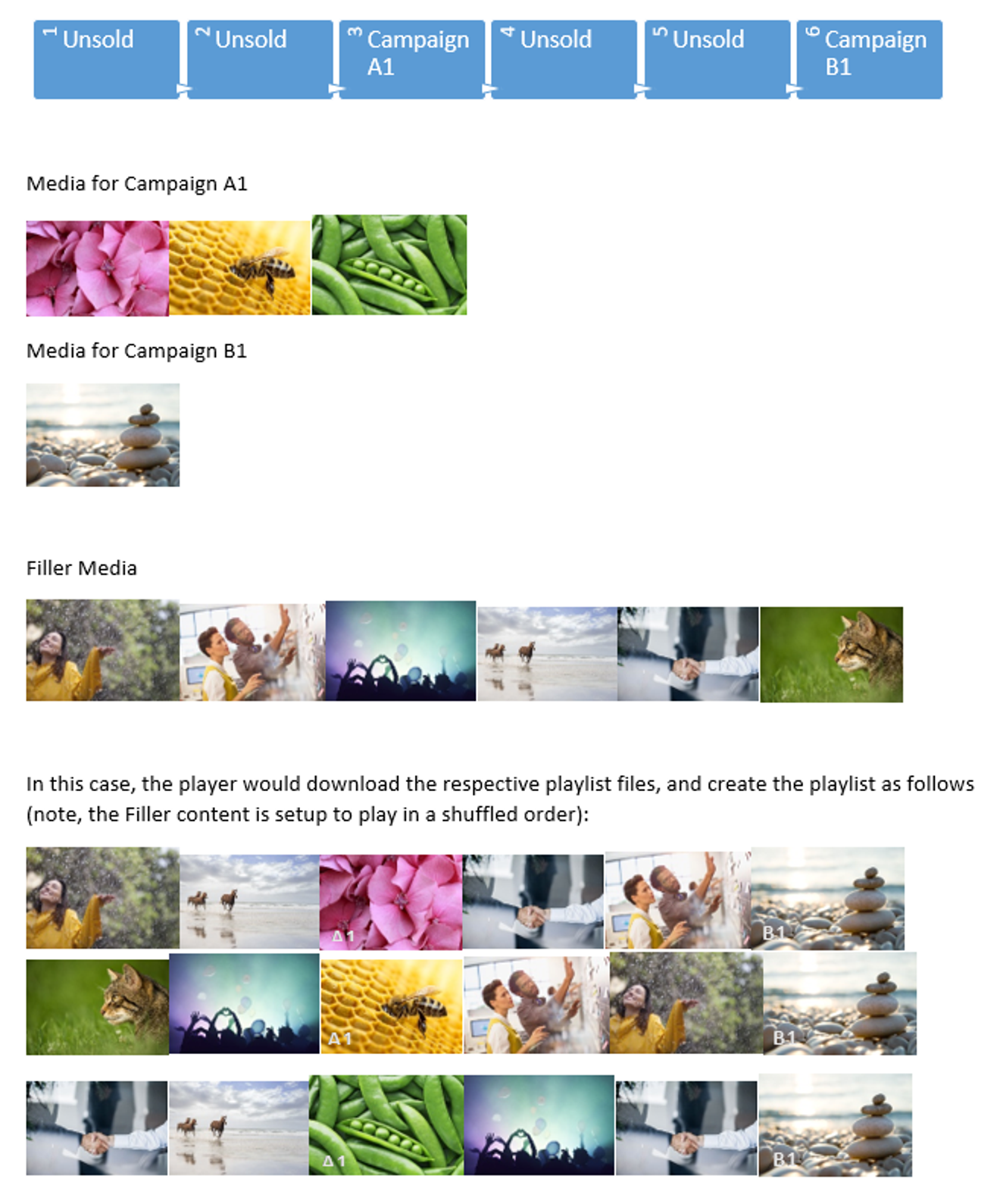

In the case of a constrained Campaign Type, a fixed number of saleable Inventory Items are pre-defined, together with a fixed slot length. This way, there will always be the same number of items in the playlist - no more and no less.
In the example above, 6 inventory items have been defined, with 10 seconds each (normally a 1.5 or 2 minute playlist with 15 second items tends to be the norm, but for ease of understanding, let's keep it as the 6 x 10 seconds).
So, the 6 items x 10 seconds means that every booked campaign will play out ONCE per minute. That's 60 times an hour, or 1440 times a day - guaranteed. This way, an advertiser knows the number of times their advert will show by multiplying the number of days the campaign runs x this figure.
How this happens is that any unsold inventory items get populated with unimportant content called 'Filler'. This is typically content you are not interested if it gets shown or not. It could be 'brand led' content, or general information - but you shouldn't get to precious about it, as **it will not show at all** if you manage to sell all of your inventory (hey, that's not a bad thing, right?).
With a classic Digital Signage package, you could just about manage to do this in your head for a while (although with lots of screens and lots of new content starting and ending at different times, it may cause a headache or two) - but DOOHAd gives you another edge. Often advertisers want to not just show a single piece of content in their campaign.
What if they want to have a campaign which cycles through different content every loop? How about if they want a Teaser campaign (which shows different adverts at different days through the overall campaign)?
DOOHAd is designed for this too (see later). As you see from the playlist above, that 6 items x 10 second playlist includes 2 x sold inventory items. The campaign A1 however contains 3 x media items they want to cycle through each playlist.
DOOHAd automatically positions the items in the playlist, but also generates the rules to not only cycle through the campaign media, but also fills in the gaps with Filler content that cycles too.
Clever, eh?
So, Campaign types allow you to choose the types of campaign your screens support, with respective types of media, and whether you want to fix the number of Inventory Items and time of those items.
#### **Screens**
Screens are end-points for the advertising. Typically they would be known as 'Players' in digital signage parlance, but as we mentioned above, DOOHAd can also be used for banners and more.
Each location contains at least one screen, and each screen may contain more that one Campaign Type. This allows your player (if it supports it) to have a full-screen advertising 'screen saver', a banner-advert when someone interacts with the screen, and then a smaller banner on popups. Or your player could use different Campaign Types to play out at different times of the day (busy periods vs quiet periods) to allow you to charge different rates per impression for those times.
Screens typically are viewed on a per-location basis or on a per screen basis (depending upon whether you allow your inventory to be sold the same across all screens at a location or are more granular in your sales). However DOOHAd also allows screens to be grouped together into meaningful groups that may be more attractive to an advertiser. For instance, screens near a high-trafficked area, or ones in a shopping malls' food court where dwell times are higher may be more attractive and thus may allow for higher charges.
#### **Campaigns and Filler**
So now you have somewhere to place your content and know how you want to sell it.
It's time to sell your content.
DOOHAd does not do this. Instead, we provide integration to some of the world's leading DooH sales tools, and can integrate with numerous other platforms to seamlessly and automatically convert your sales workflows into automated playlist management.
The Selling part is typically knowing what you have to sell, arranging a price applicable to the use and acceptable to both parties, then agreeing the contract.
The money part, we let you deal with, but knowing what you have available to sell, we *can* help with.
Once you know the locations or groups of screens your prospective buyer is interested in, DOOHAd can show you the available inventory items on those screens. Remember every day is thousands of views of the content, so it's important to know when there are spaces in the playlists for the campaigns your buyer wants - you don't want to turn away a sale if it's only 1 day out of a 30 day campaign they can't advertise on a premium screen for.
### **Proof of Playout**
Now your content is on the screens, that's all you need to worry about, right? Wrong!
Before you get paid, your advertisers will typically want to make sure they get what they paid for, and unless you or they sit in front of every screen and count the times their adverts played out, you need some way to confirm their advert *did* actually play. Acquire can provide an optional service, Acquire Vision which provides you with a DooH Industry compliant proof of play report. This service allows the player to report each complete playout instance and tag it against the campaigns you create, so you are able to share with your advertiser the confirmed number of impressions of their advert that were played. The Acquire Vision solution also allows you to filter and sort the information online (so, you can review per player or group of players for instance), download the information as a spreadsheet, and also integrate it with an anonymous audience measurement feature (Acquire Vision AI) so you can count viewership against those impressions.
More to think about
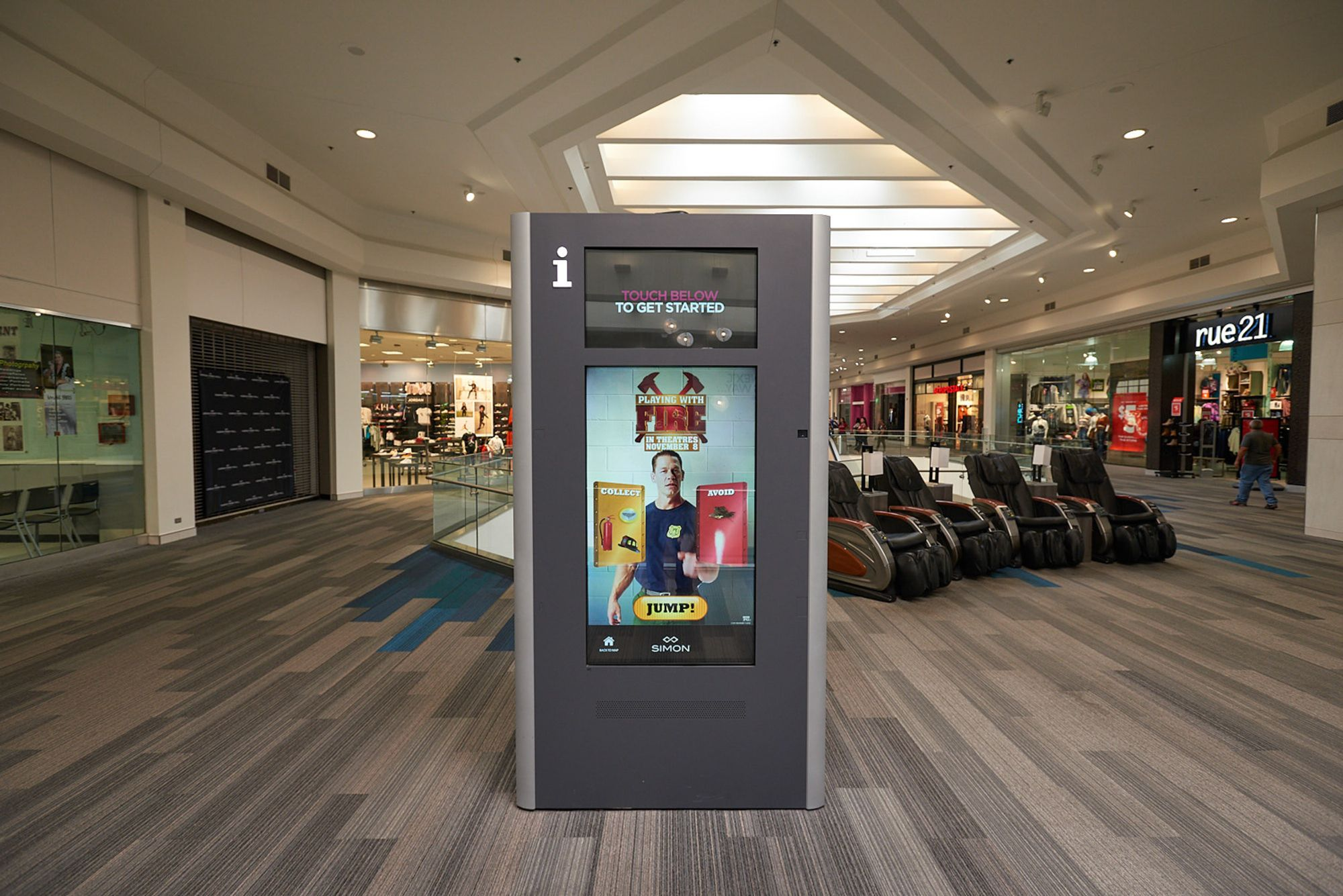
DooH is still in it's infancy and is a constantly changing landscape, as technology in the digital world (websites, social media) is used more and more in the real world. But with DOOHAd you have a future-proofed future!
Whether you want to consider reactive content and playlists driven by the number of/age/gender etc of the viewers, or want viewers to interact with fully featured adverts using touchscreens, moving their body or connecting with Mobile phones, Acquire's platforms can do it.
If you want to connect to your existing platforms you use to manage your existing Ad-sales, or produce custom rules to use live tracking and historical advertising experiences change the playlists, our modular approach to the platform allows these to be done quickly and at low cost.
- [Software Installers](https://knowledge.acquiredigital.com/software-installers?hsLang=en)
- [StudioDX & DX Player](https://knowledge.acquiredigital.com/studiodx-dx-player?hsLang=en#main-content)
- [Studio DX FAQ's](https://knowledge.acquiredigital.com/studiodx-dx-player?hsLang=en#studio-dx-faqs)
- [Acquire StudioDX User Documentation](https://knowledge.acquiredigital.com/studiodx-dx-player?hsLang=en#acquire-studiodx-user-documentation)
- [User Guide](https://knowledge.acquiredigital.com/studiodx-dx-player?hsLang=en#user-guide)
- [Widgets](https://knowledge.acquiredigital.com/studiodx-dx-player?hsLang=en#widgets)
- [Transitions](https://knowledge.acquiredigital.com/studiodx-dx-player?hsLang=en#transitions)
- [Warning Alerts](https://knowledge.acquiredigital.com/studiodx-dx-player?hsLang=en#warning-alerts)
- [Setup App](https://knowledge.acquiredigital.com/studiodx-dx-player?hsLang=en#setup-app)
- [Project Apps](https://knowledge.acquiredigital.com/studiodx-dx-player?hsLang=en#project-apps)
- [StudioDX Stream Deck Plugin](https://knowledge.acquiredigital.com/studiodx-dx-player?hsLang=en#studiodx-stream-deck-plugin)
- [XML Formats](https://knowledge.acquiredigital.com/studiodx-dx-player?hsLang=en#xml-formats)
- [Acquire Wayfinder](https://knowledge.acquiredigital.com/acquire-wayfinder?hsLang=en#main-content)
- [Map Editor - Atlas](https://knowledge.acquiredigital.com/acquire-wayfinder?hsLang=en#map-editor-atlas)
- [Devices](https://knowledge.acquiredigital.com/acquire-wayfinder?hsLang=en#devices)
- [CMS User Management](https://knowledge.acquiredigital.com/acquire-wayfinder?hsLang=en#cms-user-management)
- [Project Settings](https://knowledge.acquiredigital.com/acquire-wayfinder?hsLang=en#project-settings)
- [The Map Editor](https://knowledge.acquiredigital.com/acquire-wayfinder?hsLang=en#the-map-editor)
- [JS Web Map UI V2.0](https://knowledge.acquiredigital.com/acquire-wayfinder?hsLang=en#js-web-map-ui-v2-0)
- [JS Web Map API V2.0](https://knowledge.acquiredigital.com/acquire-wayfinder?hsLang=en#js-web-map-api-v2-0)
- [JS Web Directory API V1.0](https://knowledge.acquiredigital.com/acquire-wayfinder?hsLang=en#js-web-directory-api-v1-0)
- [Wayfinder Map API](https://knowledge.acquiredigital.com/acquire-wayfinder?hsLang=en#wayfinder-map-api)
- [Broadsign Integration](https://knowledge.acquiredigital.com/acquire-wayfinder?hsLang=en#broadsign-integration)
- [Adverts Plugin](https://knowledge.acquiredigital.com/acquire-wayfinder?hsLang=en#adverts-plugin)
- [Wayfinder FAQs](https://knowledge.acquiredigital.com/acquire-wayfinder?hsLang=en#wayfinder-faqs)
- [Beacon](https://knowledge.acquiredigital.com/beacon?hsLang=en#main-content)
- [Devices](https://knowledge.acquiredigital.com/beacon?hsLang=en#devices)
- [Layouts](https://knowledge.acquiredigital.com/beacon?hsLang=en#layouts)
- [Information Displays](https://knowledge.acquiredigital.com/beacon?hsLang=en#information-displays)
- [Playlists](https://knowledge.acquiredigital.com/beacon?hsLang=en#playlists)
- [Project Settings](https://knowledge.acquiredigital.com/beacon?hsLang=en#project-settings)
- [Activity Logs](https://knowledge.acquiredigital.com/beacon?hsLang=en#activity-logs)
- [Acquire DOOHAD](https://knowledge.acquiredigital.com/acquire-doohad?hsLang=en#main-content)
- [DOOHAd Standalone Installer & Advert Configuration Tool](https://knowledge.acquiredigital.com/acquire-doohad?hsLang=en#doohad-standalone-installer-advert-configuration-tool)
- [DooHad FAQs](https://knowledge.acquiredigital.com/acquire-doohad?hsLang=en#doohad-faqs)
- [Acquire Vision User Guide](https://knowledge.acquiredigital.com/acquire-vision-user-guide?hsLang=en)
- [Acquire StudioDX & Wayfinder Trial Install Guides](https://knowledge.acquiredigital.com/acquire-studiodx-wayfinder-trial-install-guides?hsLang=en#main-content)
- [Acquire Wayfinder Trial](https://knowledge.acquiredigital.com/acquire-studiodx-wayfinder-trial-install-guides?hsLang=en#acquire-wayfinder-trial)
- [Acquire StudioDX Trial Installation Guide](https://knowledge.acquiredigital.com/acquire-studiodx-wayfinder-trial-install-guides?hsLang=en#acquire-studiodx-trial-installation-guide)
- [Acquire Assist](https://knowledge.acquiredigital.com/acquire-assist?hsLang=en)
- [Acquire Premier](https://knowledge.acquiredigital.com/acquire-premier?hsLang=en#main-content)
- [Quick Start Guide.](https://knowledge.acquiredigital.com/acquire-premier?hsLang=en#quick-start-guide)
- [Acquire Editor User Guide](https://knowledge.acquiredigital.com/acquire-premier?hsLang=en#acquire-editor-user-guide)
- [Toolbox](https://knowledge.acquiredigital.com/acquire-premier?hsLang=en#toolbox)
- [The PLUS! Network](https://knowledge.acquiredigital.com/acquire-premier?hsLang=en#the-plus-network)
- [Acquire Site Manager](https://knowledge.acquiredigital.com/acquire-premier?hsLang=en#acquire-site-manager)
- [Apps & Helpers Manuals](https://knowledge.acquiredigital.com/acquire-premier?hsLang=en#apps-helpers-manuals)
- [Minute Master-Classes](https://knowledge.acquiredigital.com/acquire-premier?hsLang=en#minute-master-classes)
- [Acquire Editor FAQs](https://knowledge.acquiredigital.com/acquire-premier?hsLang=en#acquire-editor-faqs)
- [Acquire Player FAQs](https://knowledge.acquiredigital.com/acquire-player-faqs?hsLang=en)
- [Site Manager](https://knowledge.acquiredigital.com/site-manager?hsLang=en#main-content)
- [Site Manager User Guide](https://knowledge.acquiredigital.com/site-manager?hsLang=en#site-manager-user-guide)
- [Site Manager FAQs](https://knowledge.acquiredigital.com/site-manager?hsLang=en#site-manager-faqs)
- [Watchdog](https://knowledge.acquiredigital.com/watchdog?hsLang=en#main-content)
- [Watchdog User Guide](https://knowledge.acquiredigital.com/watchdog?hsLang=en#watchdog-user-guide)
- [Watchdog FAQs](https://knowledge.acquiredigital.com/watchdog?hsLang=en#watchdog-faqs)
- [FAQs](https://knowledge.acquiredigital.com/faqs?hsLang=en)
[](http://acquiredigital.com)
[mailto:email@email.com](mailto:email@email.com)
Copyright © 2026, Acquire Digital