
Activity Logs provide a read-only history of changes made by operators and the system. Use them to review who changed an entity and when.
Filter the logs
Open Activity Logs from the side navigation. Available filters are:
- Organisation — visible only to administrators.
- Action — Create, Read, Update, Delete, Login or Logout. Read actions are excluded by default.
- Model — the type of record, such as Device, Layout, Information Display, Playlist or Automation.
- Date from / Date to — an optional date and time range.
- Clear — removes all filters and returns to the first page.

Changing a filter returns the results to page one.
The Activity Logs list
The table shows:
- Date — when the activity occurred.
- Organisation — administrator view only.
- User — the operator name, identifier or System.
- Action — the type of activity.
- Model — the affected record type.
- Description — additional context when provided.

Use the controls below the table to choose 10, 20, 50 or 100 rows per page and move between pages.

View activity details
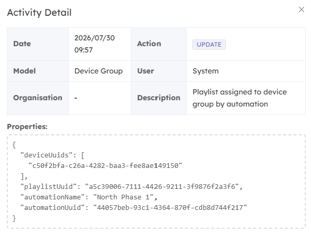
Select any row to open Activity Detail. The dialog shows the date, action, model, user, organisation and description. When the activity contains additional properties, Beacon displays them below the summary.
Activity Logs cannot be edited from this page.