
he network allows you to control, update and monitor the status of your player machines in real time from any location, whilst it constantly monitors and communicates with the players to ensure maximum up time. Typically, the system operates what is known as a ‘pull’ technology where the players regularly contact the servers and ‘pull’ the updates to themselves, but in the case of emergencies, content can also be ‘pushed’ to the players.
If multiple player units are located at a single site, a Media Server can be installed which assists in the collection of updates so that the network remains as fast as possible, normally removing the need for broadcast updating such as via satellite (although for time-critical updates, Acquire can also be made to use this technology if required).
For more information about the PLUS Network and how it can help you manage your network, please visit www.acquiredigital.com or contact your local reseller.
TIP: The PLUS! Network can also integrate with Acquire Digital remote maintenance and management system known as Site Manager to allow teams of dedicated engineers to pro-actively monitor the players and remotely repair them if necessary. This saves time and money over traditional servicing options and means that the players are typically operating 99% of the time when in the field.
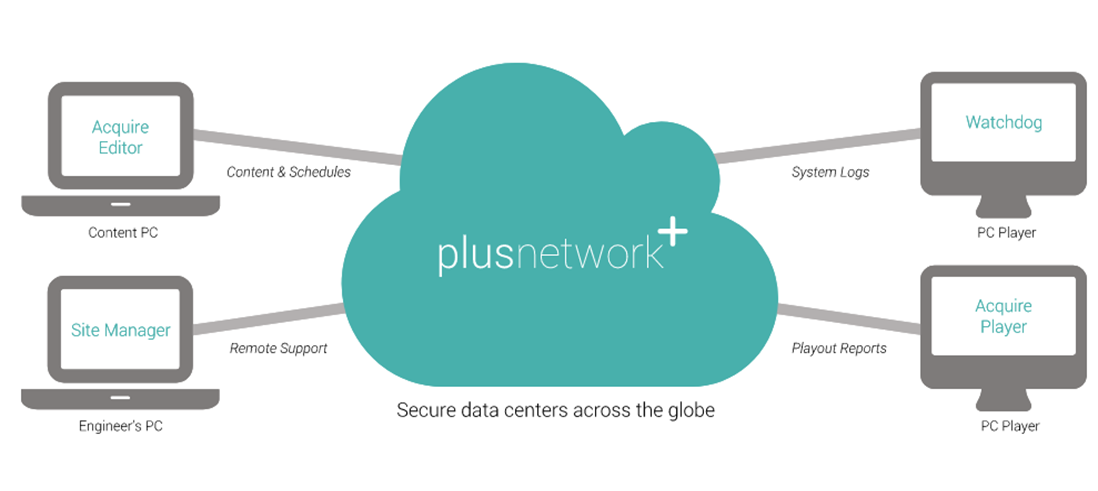
Introduction to the PLUS! Network.
Integrated within Acquire is the simple to operate connection to our PLUS! Network. This provides you with fire-and-forget assurance when deploying your content. The PLUS! Network allows you to deploy content to multiple units simultaneously. It then lets you track the status of deployment until it is live.
Among the key advantages of the PLUS! Network are:-
-
Significantly more efficient file delivery than FTP (faster transfer using less bandwidth).
-
Guaranteed (Single or Multiple pass) delivery of files.
-
Works very well over congested networks with high latency.
-
Advanced bandwidth controls (amount of bandwidth by job).
-
Highly effective automated content compression.
-
Scheduled delivery.
-
Encrypted Data delivery.
-
Instant visibility of your deployment status.
-
Automatic error handling.
-
Forward error correction.
-
Support for large files (up to 100GB).
-
Ability to group receivers in multiple combinations.
-
Automated interaction with existing applications via our robust API.
-
Optional Combination satellite and terrestrial transports (mixed networks) allows for multicast sending with terrestrial back channel.
The PLUS! Network provides many features to enable you to manage a network of players, each one operating with individual content, or the same content. Although each player operates independently, details of the status of the deployment and the operability of each player in the estate is always visible to the content manager.
Before you can use the scheduler, you will need to understand a few principles of how Acquire operates with the PLUS! Network.
Each PLUS! Network client has their own, secure account. Although the network is used by different clients (rather like the telephone network), all of the content and network data is protected by encryption and specific user accounts.
Each user has a unique account on the network with specific access rights. When you signed up for the PLUS! Network account, you will have provided user details and access rights for each user. Typically, you may have the following types of user (although these tasks may be done by the same person):
Content Manager - Their job is to develop the content pages, then schedule them onto the respective players.
Network Manager - Their job is to monitor the players on the network and ensure that they are operating correctly (these users may also use the Kiosk Monitor system). As part of their role, they will decommission players which have failed and need to be replaced (see later).
Engineer: This user typically visits sites to install player units. As part of their role, these users will use the Activ8 program to commission players onto the client’s account.
Client Manager: This user is typically responsible to an end-user client and will use the tools to monitor and report the status of the network. (note that a separate ‘Site Manager’ program is also available for this user or the end-user client themselves to use).
As the PLUS! Network intelligently manages the editor/player communications, everything starts with the player unit. Once the Acquire Player software has been installed on the Player PC unit, the Engineer should then connect the player PC to the internet (this does NOT have to be at the final installation site) and then run the Activ8 program on the player. After the user enters their user name and password, they will be able to enter details of the player (name, location, etc), and the Activ8 program will create a new ‘player’ account on the network for this unit.
Once this is done, the player will appear in the Site Manager for this account with all the details that the engineer entered against it. When the Content Manager logs onto the PLUS! Network, they will be asked to choose a project. If they move the player into any groups, this player will become associated with this project and will no longer be visible in any other projects (unless it is removed from all groups in the project). By doing this, you are able to use the same login account to manage players which have completely separate content and keep this content.
Now the player will be seen in the Scheduler and Site Manager and can have content assigned and deployed to it. Thousands of groups and sub-groups can be created and Players can be placed into one or more of these to enable you to manage similar Players together for content management (e.g. Players could be in the ‘United Kingdom’ group and have nationwide UK-based content added to the playlists, but some of these players could also be in a ‘Plasma’.
Screen’ group and also have 16:9 format content added, whilst other players in a ‘Projector’ group would have 4:3 format content added
Acquire will keep you updated with the status of the machine and any deployments to it by coloured markers (a colour on the ‘screen’ of the icon shows the deployment status, and an overlaid symbol shows the physical status of the player). Unlike some networks, Acquire allows you to transfer content to each player in advance of when it is required (either in a scheduled playlist or by using a ‘Jump to’ event on a page). This not only means that you can store content on the players in advance, but you can also hold content on the players (storage space permitting) and only remove it if you are certain that it will not be required again (SEE: House keeping).
In addition, the players have local intelligence and do not require a live link at all times to operate. It is perfectly acceptable to have a player which plays 24/7 but is only connected to the Internet in the evenings. Acquire provides you with a feature to control how often the player will collect the content, and you can even restrict deployments to specific timeslots (such as in the evenings only when the local internet link is quieter). For urgent updates, Acquire can ‘push’ content to the players instantly with a ‘Priority Message’ which is sent and active within seconds.
To assist the Content Manager and Network Manager, many in-depth details are automatically recorded by the PLUS! Network and are available to view through the Site Manager. These include details of who did what and when, the sequence of events as a deployment is sent and applied, Bandwidth usage, and much more. These are invaluable in enabling larger networks to operate.
Acquire also makes managing failures simple - Although most hardware is usually reliable, occasionally faults or damage can occur to them. However, Acquire allows you to decommission failed players and when the replacement player is commissioned, the failed player can be selected and all of the previous settings are retained, whilst all of the content which should be on that player will automatically download and deploy.
As you see, Acquire and the PLUS! Network are powerful tools to enable you to create and operate a live network of remote players with the minimum of fuss. Although these instructions may seem daunting at first, you will find that is quite easy to set up and manage a network, and as time goes by, the tools and information provided will become more useful to you.