
To create your Acquire Project...
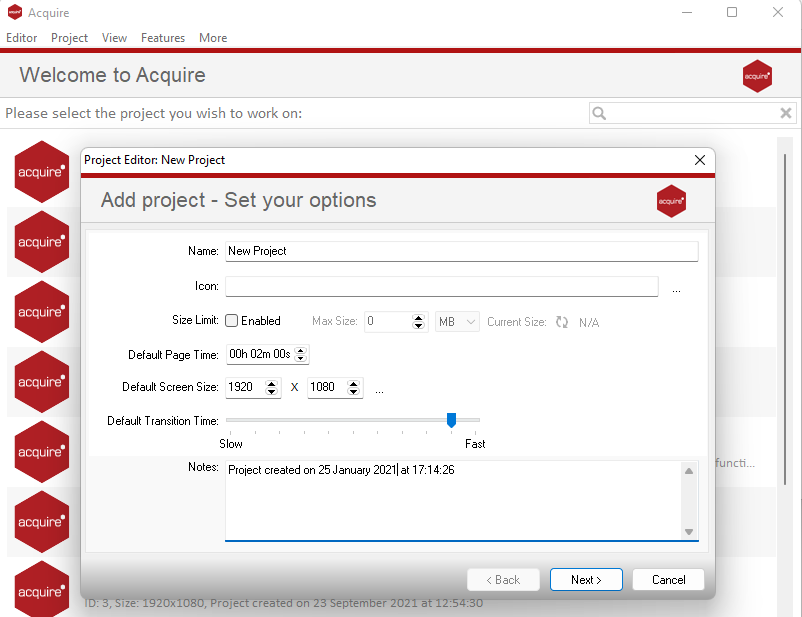
- Install or create a new project in the Acquire Editor. If you add a new project for the advanced player, you do not need to configure anything other than the name and folders. The folders can reside on the same computer or across a network share. All of the media used in the project will be stored here.
💡Note: that the media you store in the project on this computer is mirrored on all of the players (only the content which needs to play is played out).
It is good practise to keep similar types of media sorted into folders, to name files appropriately, and to delete or archive old media that is no longer used out of the project folder.
- Create the groups (of players) definition file
(This will be provided by Acquire or their partner as part of the setup and configuration. This is usually done once upon initial setup and is not usually required to be altered. Details are included below in the XML formats section of this document for your reference)
-
It needs to be in this folder:
- {project folder}\media\Always Send\groups.xml
-
The groups.xml is described here: Groups.xml
- It contains a list of players by group. Each player has a main and backup PC. Each PC has a list of display outputs and server addresses for TCP mode.
- Create the display mapping file
(This will be provided by Acquire or their partner as part of the setup and configuration. This is usually done once upon initial setup and is not usually required to be altered. Details are included below in the XML formats section of this document for your reference)
- It needs to be in this folder
- {project folder}\media\Always Send\mapping.xml
- The mappings.xml is described here: Mappings.